Check every item before you deliver. Tap the arrow on any item for a visual guide.
0 / 16
All checks complete — ready to deliver!
1
Eye Lines
0 / 1
Eye line is consistent across entire video
Subject's eyes stay at the same height across every cut and crop
Why it matters: If the subject's eye level jumps between cuts, the viewer subconsciously notices. It feels jarring even if they can't explain why. Keep the eye line at the same height across every angle and crop.
2
Safe Zones
0 / 1
Video checked with platform UI overlay.
Nothing important hidden by platform UI
Faces, captions, text, and key visuals all clear of side icons, username bar, and caption area
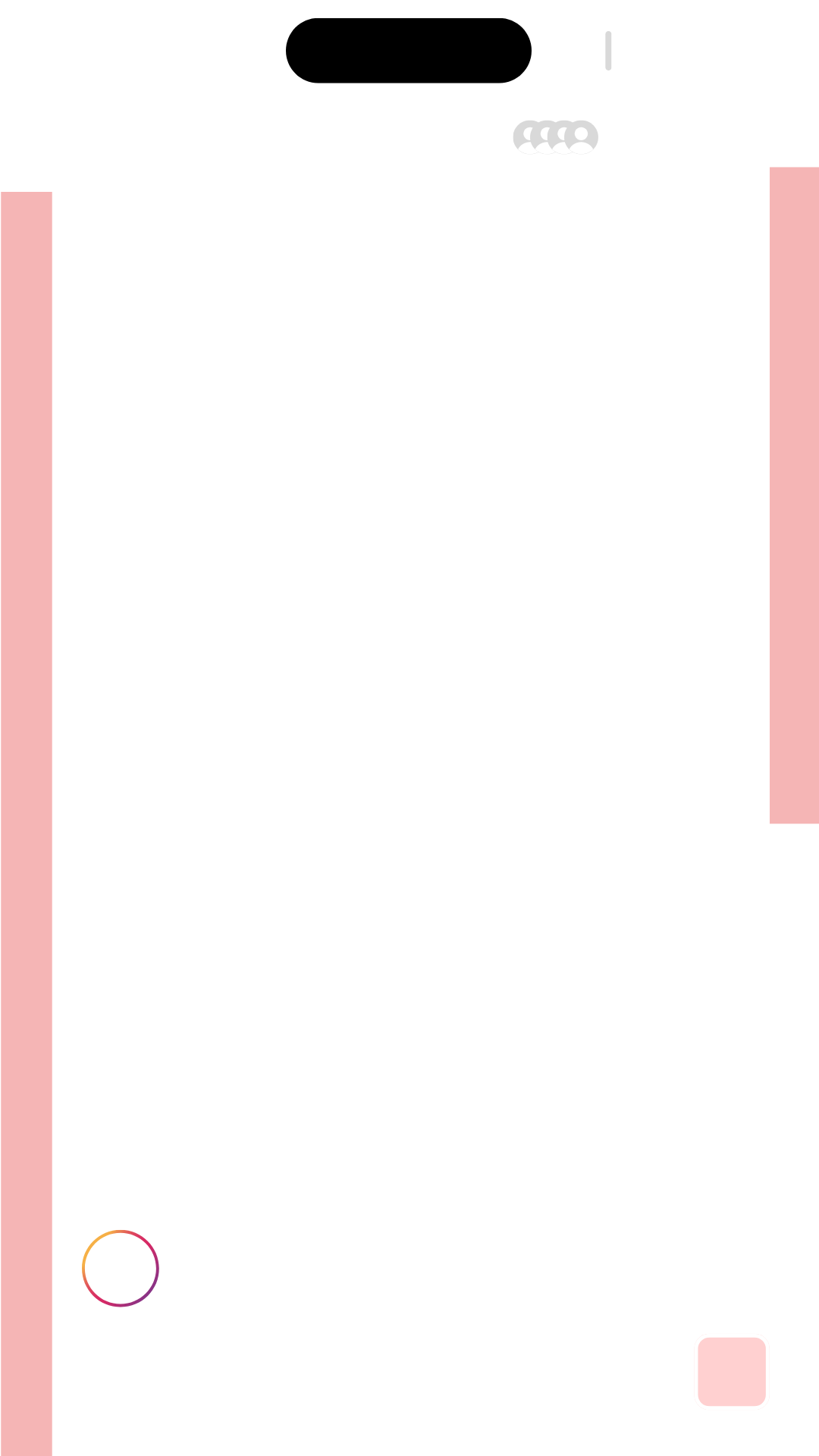
Use the overlay. The pink zones show where platform UI (icons, usernames, captions) covers the frame. Keep all important content, faces, text, and visuals out of these areas. Download the overlay and drop it over your edit to check.
3
Spelling
0 / 3
Australian spelling used throughout
colour, organise, centre — not American English
We use Australian English. Watch for -our (colour, behaviour), -ise (organise, specialise), and -re (centre, metre). Spellcheck defaults to American — don't trust it blindly.
All captions proofread
Every subtitle checked for typos, grammar, and spelling
Read every caption out loud. Auto-generated captions are full of errors. Read each one word-by-word — check for homophones (their/there/they're), missing words, and incorrect punctuation.
All on-screen text proofread
Titles, lower thirds, and text overlays all double-checked
Pause on every text frame. Scrub through and stop on every frame that has text. Read it carefully — typos on screen are far more visible than in captions and much harder to fix after delivery.
4
Hook
0 / 3
First 3–8 seconds
Opening creates curiosity or tension
Viewer has a reason to keep watching within the first few seconds
Most viewers decide in 3 seconds. Open with something that creates curiosity, poses a question, or shows an unexpected visual. No logos, no "hey guys", no dead air.
No slow intro
No logos, "hey guys", or generic intros before the hook
Cut straight to the point. If the first thing the viewer sees is a logo animation or a generic greeting, they'll scroll past. The hook should be the very first frame. Branding comes later (or never).
No dead air
Audio and visuals start immediately — no silence or black frames
Frame 1 should have energy. Even half a second of silence or a black frame at the start can lose viewers. Trim the head of the video tight — audio and visuals should hit immediately.
5
Flow
0 / 5
Cuts feel natural and rhythmic
Each edit point feels intentional, not random
Cut on the beat. The best cuts happen on natural speech rhythms — at the end of a sentence, on a pause, or when the speaker shifts topic. Cutting mid-thought feels jarring.
No jolty transitions
Elements all ease in and ease out — nothing snaps on or off
Ease everything. Text, graphics, lower thirds, image overlays — they should all animate in smoothly and animate out smoothly. If anything pops on or off abruptly, add easing. Linear keyframes feel robotic.
No distracting effects
Visual effects serve the story, don't draw attention to themselves
If you notice the effect, it's too much. Good effects are invisible — they enhance without being noticed. If a zoom, flash, or transition makes you think "that was cool", it probably pulled attention away from the message.
No distracting SFX
Sound effects enhance, not overpower — subtle is better
SFX should be felt, not heard. A subtle whoosh on a text pop or a soft click on a cut is fine. If the sound effect competes with the speaker's voice or makes you flinch, turn it down or remove it.
Pauses and breaths trimmed where needed
Dead space removed without making it feel rushed
Trim, don't eliminate. Remove long pauses and audible breaths between sentences. But don't cut so tight that it sounds like a robot — leave a tiny beat between thoughts so it still sounds human.
6
Pacing
0 / 3
No slow sections where attention drops
Every part of the video earns the viewer's next second
Watch it as a viewer. Play the video back and notice where your own attention drifts. If you zone out, your audience will too. Those sections need tightening — cut, add visuals, or speed up the delivery.
Images, text or effects support the story
Visual elements reinforce what's being said, not just decoration
Every visual should earn its place. If someone mentions "revenue", show a graph. If they say "team", show the team. Don't add random stock images or effects just to fill space — every visual should reinforce the message.
Visual change every 2–5 seconds
Cut, zoom, b-roll, image overlay, or text — something should shift
Something should change every 2–5 seconds. This doesn't mean frantic cuts — it means a cut, zoom, b-roll, image overlay, or text pop. If the viewer sees the exact same static frame for 5+ seconds, their attention is already gone.
😜
When in doubt — ASK
Not sure about an edit, a cut, or a creative decision? Don't guess. Ask the team. A quick question now saves a re-edit later.